In a world where our smartphones are an extension of our personal lives, the thought of someone accidentally—or deliberately—scrolling through our photos can be a source of significant anxiety. We share our phones with family, hand them to friends to show a quick picture, or sometimes just misplace them. This creates a genuine need for a robust, reliable way to secure our most private visual memories.
Photo Lock - Hide Pictures, developed by DEEP SPARK LTD, steps up as a comprehensive solution to this modern privacy dilemma. With over 100 million downloads and 1.3 million ratings, it has clearly resonated with a massive audience seeking a secure digital vault. It goes far beyond a simple file hider, offering a sophisticated suite of features that turn your phone into a fortress for your private data.
The Art of Disguise: The Calculator Lock
The app's most ingenious and talked-about feature is its "Calculator Lock." This is a brilliant piece of security theater. Instead of a telltale app icon labeled "Photo Vault," the app can disguise itself as a completely mundane calculator. To anyone casually glancing at your phone, it appears to be a standard, boring utility app.
To access your hidden vault, you simply open the disguised calculator and enter your specific numeric password followed by the '=' sign. If you enter the correct code, the app transforms, revealing the main interface of the Photo Lock. If you enter a wrong password, it simply functions as a regular calculator. This provides an incredible layer of security through obscurity, making the vault virtually invisible to anyone without your specific password.
A Fortress of Features for Your Privacy
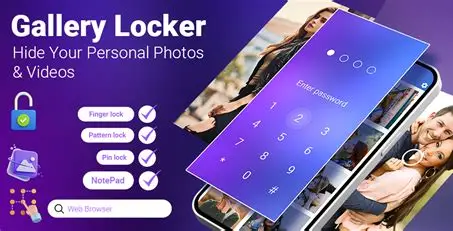
The app is packed with features designed to give you complete control over your digital privacy. It’s not just a place to stash a few pictures; it's a comprehensive privacy management suite. The developer has clearly thought about the many ways users need to protect their data, including:
- Vault for Images & Videos: The core function. You can securely import, store, and manage an unlimited number of photos and videos in an encrypted, hidden space.
- Private Notes: A secure place to store sensitive text information, keeping it separate from your phone's main notes app.
- Privacy Browser: Surf the web without leaving a trace, with history and downloads contained solely within the app's secure environment.
- Direct Download to Vault: Save media from the internet directly into the vault, skipping your phone's main gallery.
- Guest Locker: A clever feature that allows you to set up a second, decoy vault with a different password. This is perfect for sharing your phone with someone you don't fully trust, giving them access to non-sensitive media while keeping your true secrets hidden.
Advanced Security and User Convenience
The app seamlessly blends high-level security with features that make it a joy to use. It integrates modern biometric authentication, allowing you to unlock the app with your fingerprint for quick and convenient access. It also provides a "Face Down Lock" feature, which automatically locks the app and hides your content when you place your phone face down, adding a layer of physical security.
Furthermore, the app is designed to be completely transparent about its actions. It features an "Intruder Image" function that will automatically capture a photo of anyone attempting to access the vault and failing to enter the correct password. This provides undeniable evidence of prying eyes and acts as a powerful deterrent.
User Experience: A Mixed Bag of Praise and Puzzles
The app's massive popularity is a testament to its core functionality. Many users trust it to keep their sensitive files safe. However, a deep dive into user reviews reveals a more complex picture. The most prevalent feedback, particularly from early reviews, revolves around a simple, yet crucial question: "What is the original password?"
This suggests that some users may have forgotten or not been aware of the initial setup process. This highlights a potential user experience hurdle—the need for clear guidance during the app's initial launch. Other reviews are positive, praising the app's effectiveness and level of security.
Data Privacy and Transparency
In the digital age, data privacy is paramount, especially for an app designed to store your most sensitive files. The app's Play Store listing is reassuringly transparent on this front. It states that the app does not share data with third parties and does not collect any personal data. This is a major positive and a significant selling point for privacy-conscious users.
It also confirms that data is encrypted in transit, ensuring that your files are protected as they travel to the app's secure environment. The only drawback is the note that data cannot be deleted, which is a common policy for many apps used for analytical and service improvement purposes.
The Verdict: A Must-Have for the Privacy-Minded
Photo Lock - Hide Pictures is a robust and reliable guardian of your digital privacy. Its standout feature is the clever calculator disguise, which provides a unique and effective layer of security. The app's comprehensive suite of features, from the guest locker to the intruder camera, makes it a versatile tool for anyone looking to protect their personal data.
While the app has received some criticism regarding user experience around the initial setup, its core functionality is undeniable. The app's strong stance on data privacy, with no data collection or sharing, makes it a trustworthy choice. For anyone who has ever felt the need to hide a file from prying eyes, this app is a highly recommended, effective, and secure solution. It delivers on its promise of offering "ultimate privacy protection," empowering users to take control of their personal information with confidence.