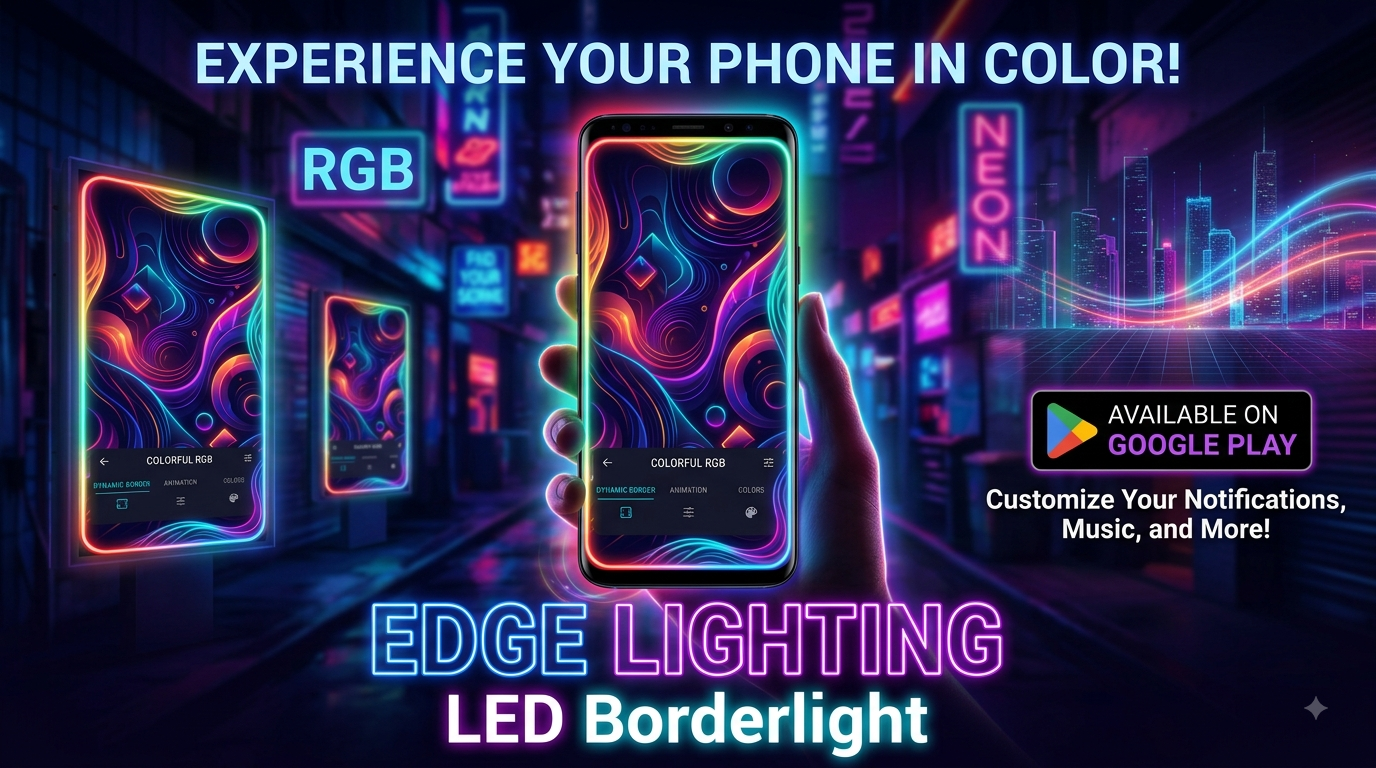
In a world where our smartphones are extensions of our personality, the visual experience matters more than ever. We meticulously choose wallpapers, icon packs, and themes to make our devices feel uniquely ours. But what if you could add a layer of dynamic, reactive illumination that makes your screen literally come alive? Enter Edge Lighting - Borderlight, an app that has captured the attention of over 50 million downloads on the Google Play Store, promising to banish screen monotony with a cascade of colorful, animated light.
This isn't just another static wallpaper app. Edge Lighting - Borderlight, developed by ZipoApps, functions as a dynamic live wallpaper specifically designed to add a beautiful, curved "LED" light effect to the edges of your Android screen. Whether you have a phone with a notch, a punch-hole camera, or a classic bezel, this app aims to wrap your display in a customizable aura of light, turning both your home and lock screens into a visual spectacle.
What Exactly Does Edge Lighting Do?
At its core, the app provides a sophisticated edge lighting effect that acts as a live wallpaper. It's designed to highlight the contours of your screen with a glowing, animated border. The magic lies in its adaptability; it's not a one-size-fits-all effect. You have a significant degree of control to tailor the look to your precise preference. It works by utilizing a dynamic wallpaper service, which means the light show continues even when your phone is idle, provided the necessary permissions are granted.
The application stands out for its extensive customization options. You are not stuck with a single color or style. You can dive into the settings to tweak almost every aspect of the effect. This level of control ensures that the edge lighting can seamlessly integrate with your existing theme or become a bold, standalone statement piece. It's a simple concept with a powerful visual payoff.
Diving into the Customization Ocean
The true power of Edge Lighting - Borderlight is revealed in its customization suite. It’s packed with features that allow you to fine-tune the lighting to match your mood or aesthetic. Here’s a breakdown of what you can expect to adjust:
- Color Customization: The most basic, yet impactful, feature. You can change the border's color to anything you like, from a single, solid hue to a dynamic gradient.
- Border Shapes & Styles: Move beyond a simple line. The app boasts over 15 distinct border types, including playful shapes like hearts, birds, stars, and even seasonal icons like snowflakes and Christmas trees.
- Fine-Tuning Controls: Adjust the animation speed, the width of the border, and the curve radius for both the bottom and top of the screen.
- Notch & Punch-Hole Adjustment: This is a crucial feature for modern phones. You can precisely adjust the border to accommodate your device's specific notch or camera cutout, ensuring a perfect fit.
- Wallpaper Integration: You aren't limited to the light effect alone. The app allows you to set your own photos or choose from their collection of 4K backgrounds to sit behind the edge lighting, creating a layered and rich visual experience.
This level of detail ensures that no matter your device or style, you can create a look that feels tailor-made.
The Magic is in the Details
Beyond the standard settings, the app offers a "Magical Borders" section, which provides over 30 pre-set, one-tap edge lighting effects. These are curated combinations of colors, animations, and patterns designed to deliver an instant, impressive visual. These presets are perfect for users who want a stunning result without spending time on manual adjustments.
One of the key features advertised is the ability to display the edge lighting over other applications. This means the effect isn't confined to just your home screen; you can have a subtle, colored glow around the edges of your screen even when you're browsing social media or reading an article. This relies on the app's ability to draw over other apps, which requires a specific permission.
How Does It Work? The Accessibility Service Explained
To function over other apps, Edge Lighting - Borderlight requires the Accessibility Service permission. This is a critical point that the developers explicitly address. They clarify that this permission is used solely for the purpose of displaying the edge lighting effect on top of other applications. It's a necessary technical requirement for that specific feature.
The app's privacy policy, as stated on its Play Store page, assures users that no personal information is collected through this service. They emphasize they do not read sensitive data or the content on your screen. The permission is purely for delivering the core visual functionality. As with any app that uses such permissions, it's always wise to understand the rationale, and ZipoApps provides a clear justification for its use.
User Feedback: A Mixed Bag of Brilliance and Bugs
With over 750,000 ratings, the app has a vibrant community of users. The reception is largely positive, with many users praising the visual appeal and the level of customization available. People love transforming their phone's look and making the edge lighting a signature part of their device's personality.
However, the app is not without its criticisms. Some users have reported issues, such as the edge lighting disappearing after closing the app or the need to manually re-enable permissions each time. This suggests a potential conflict with device battery optimizations or background activity restrictions imposed by newer Android versions. The developers are actively responsive, often replying to reviews and encouraging users to contact support directly to resolve specific technical issues.
Final Verdict: Is It Worth Your Screen Space?
Edge Lighting - Borderlight offers a unique and highly visual way to personalize your Android device. It successfully delivers on its promise of adding a dynamic, colorful edge to your screen with a remarkable degree of customization. For anyone looking to move beyond static wallpapers and inject some personality into their phone's interface, this app is a compelling option.
However, potential users should be aware of the technical requirements. The app needs certain permissions to work at its full potential, and depending on your phone's battery-saving settings, you might encounter minor glitches. The app's approach to data is straightforward, with transparency regarding the use of the Accessibility Service. Overall, for a free app with this level of functionality, it provides a genuinely cool and engaging way to make your phone stand out from the crowd, provided you're willing to tweak the settings to get the perfect fit.