For the modern smartphone user, battery life is a persistent concern. We obsess over percentages, carry power banks, and scrutinize charging speeds. This is where battery monitoring apps become essential, offering a granular view of our device's power dynamics. AmpereFlow is a standout in this category, an app that transforms your Always-On Display (AOD) into a sophisticated, real-time battery meter. With over half a million downloads and a solid 4.4-star rating, it has built a loyal following. But as we examine it in 2026, a picture emerges of a powerful utility that, while functionally excellent, is marred by localization issues that undermine its polish.
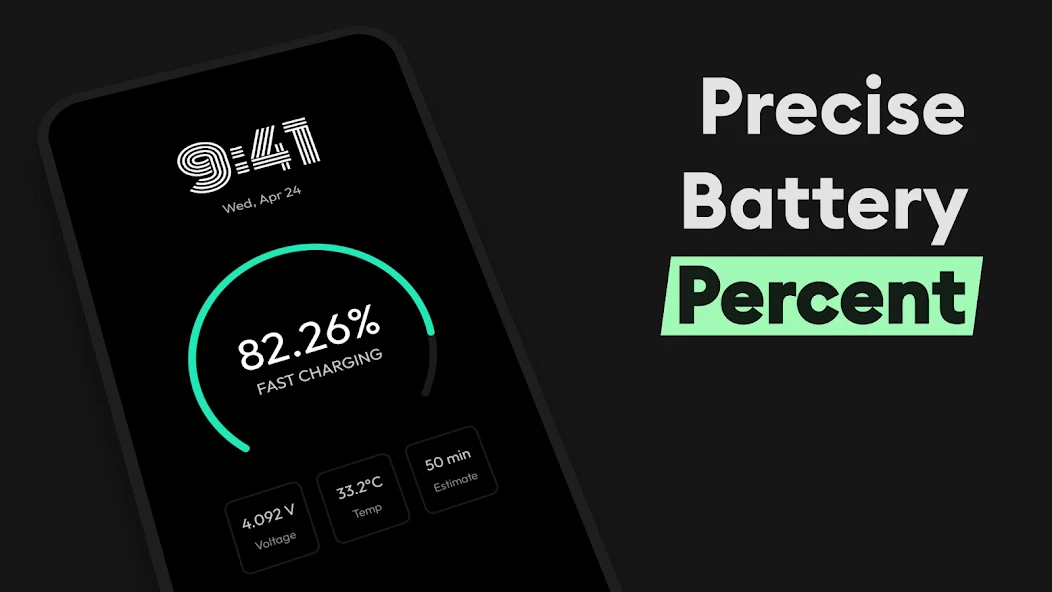
AmpereFlow's core mission is to provide a clear, comprehensive, and always-accessible view of your battery's status. The app's marquee feature is its integration with the AOD, turning your phone's lock screen into a live dashboard of power data. You can see real-time amperage readings for charging speed, a precise battery percentage (with decimals), and even the voltage and temperature of the battery . This transforms the often-static AOD into a functional tool, allowing you to gauge your device's state without even unlocking it. For power users, this is a game-changer.
A Suite of Monitoring and Alert Tools
Beyond the AOD, AmpereFlow is a full-featured battery monitor. It automatically detects and displays whether your phone is fast charging, a key piece of information for quick top-ups. The app includes battery health monitoring, which tracks the long-term state of your battery to help you understand its capacity and performance over time. The ability to set custom battery alerts is a practical feature for those who want to avoid running out of power or overcharging their device. All this data is presented through a stylish, customizable speedometer gauge that visually represents your charging speed, adding a touch of flair to a functional tool.
Key Features at a Glance
- AOD Integration: Shows charging speed, battery percentage, and other stats on the Always-On Display.
- Real-Time Monitoring: Displays amperage, voltage, temperature, and charging status in real-time.
- Battery Health: Monitors battery health and capacity over time.
- Fast Charging Detection: Alerts you when your device is in fast-charging mode.
- Customizable Alerts: Set notifications for specific battery levels or charging thresholds.
- Visual Gauges: A stylish speedometer and various widget options for at-a-glance data.
The User Experience: Functionality Overlooked by Translation
The app's core functionality is highly praised. Users find it "very good," "helpful," and "one of the best" for its specific purpose. The ability to see charging time estimates and precise power data is a clear value-add, and the app does this reliably. However, a significant blemish on the experience is the quality of the Chinese localization. One detailed review points out glaring translation errors, such as "charging" being translated as "收费" (which means "charging a fee") and "lifetime" as "寿命" (which means "life span" or "service life" of a product), which are incorrect and misleading . This is a critical issue for a global app, as it directly impacts usability and user perception. The developer's response to this review acknowledges the feedback, but the initial translation quality suggests a lack of professional localization, which can make the app feel untested and less polished in non-English markets.
Another user reported a technical conflict between the AOD features of AmpereFlow and another app from the same developer, noting that both require AOD functionality and they conflict with each other. This points to a lack of integration within the developer's own ecosystem, forcing users to choose between features. The developer's response to this user also indicates a willingness to investigate the issue and suggests that separate AOD styles for charging and lockscreen states would be a good feature to implement.
The Verdict: A Powerful Tool with a Polishing Problem
AmpereFlow is a powerful, functionally rich battery monitoring app that delivers on its promise. For users who want detailed, always-accessible power data, it's an excellent choice. Its AOD integration is a standout feature that sets it apart from simpler battery monitors. The app is clearly designed for power users who want full control and insight into their device's charging and battery health.
However, the app's polish, especially in non-English markets, is lacking. The translation errors are a significant oversight that can confuse and frustrate users. For a utility app, where clarity is paramount, such mistakes are particularly damaging. While the core functionality is strong, the overall user experience is let down by this lack of attention to localization. If the developer can address these translation issues and integrate their apps more seamlessly, AmpereFlow could easily become the definitive battery monitor for Android. For now, it's a powerful tool that's held back by a lack of attention to detail in its presentation.